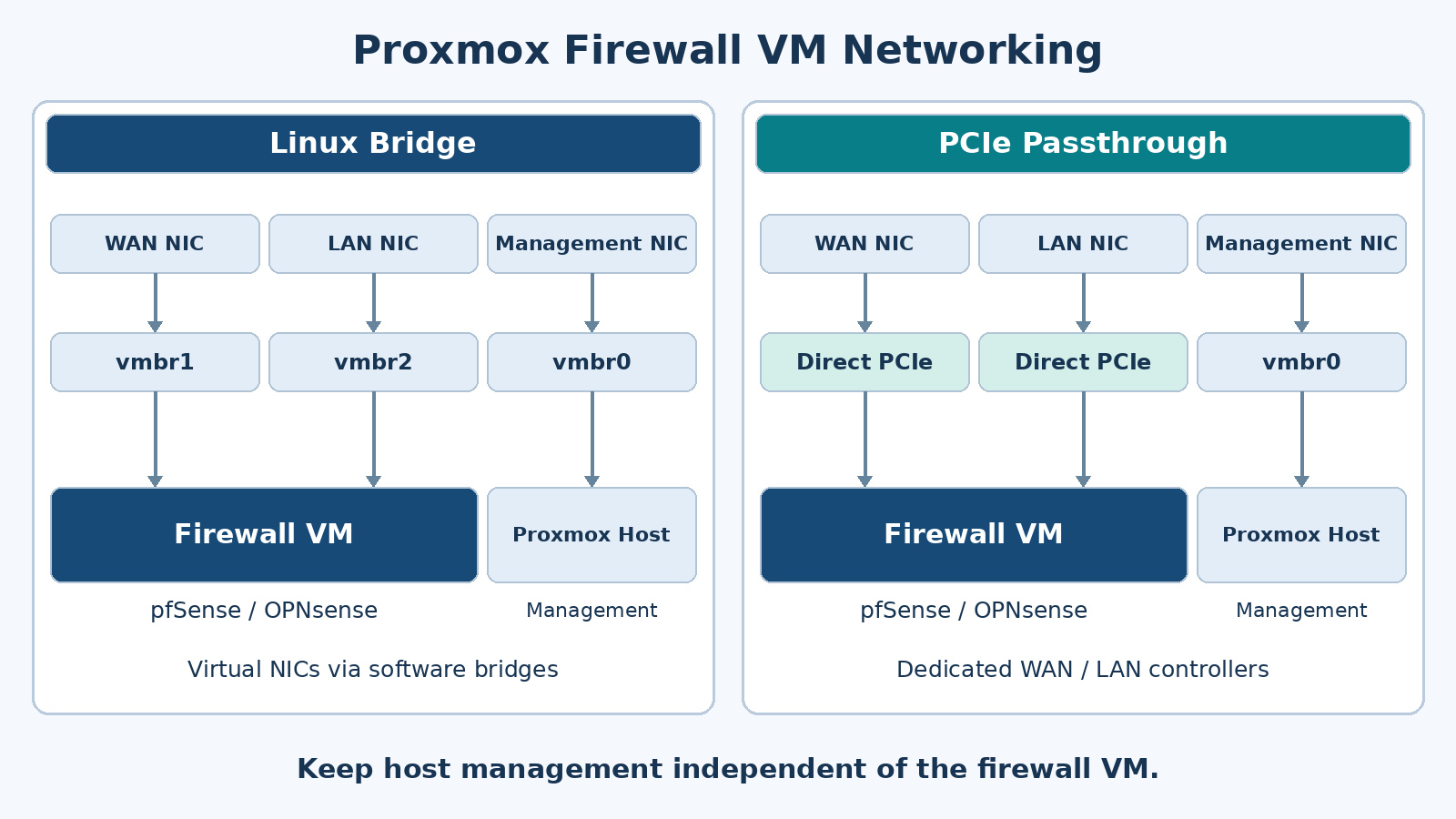



Proxmox Network Bridge vs PCIe Passthrough: How to Connect a Firewall VM
Running pfSense or OPNsense inside Proxmox allows a single Mini PC to handle firewall services alongside other virtual machines. However, the way physical Ethernet ports are assigned can affect network isolation, driver compatibility, and system maintenance.
Proxmox provides two common approaches: Linux Bridge and PCIe passthrough. Each offers different advantages depending on the network architecture.
1. Linux Bridge: Share Physical Network Interfaces
A Linux bridge acts as a virtual Ethernet switch inside Proxmox. Physical network interfaces connect to bridges, and virtual machines connect through virtual network adapters such as VirtIO.
For a four-port Mini PC, a possible configuration is:
Physical port | Proxmox bridge | Function |
|---|---|---|
LAN 1 | vmbr0 | Proxmox management |
LAN 2 | vmbr1 | Firewall WAN |
LAN 3 | vmbr2 | Firewall LAN |
LAN 4 | vmbr3 | Additional network segment |
To configure this arrangement, open Node → System → Network in Proxmox and create the required Linux bridges. Assign the corresponding physical interfaces, then connect the firewall VM's virtual network adapters to those bridges.
The WAN bridge should not normally have a Proxmox management IP address.
Linux bridges are convenient when several virtual machines need access to the same network. VirtIO also allows the guest operating system to use virtual network drivers rather than directly managing the physical Ethernet controller.
2. PCIe Passthrough: Assign a NIC Directly to the Firewall
PCIe passthrough gives a virtual machine direct control of a physical PCIe device. Unlike bridged networking, the assigned network controller is no longer available for normal use by the Proxmox host.
Before configuring passthrough:
Enable Intel VT-d in the BIOS where supported.
Verify that IOMMU is active in Proxmox.
Check the network controller's IOMMU group.
Confirm that the guest operating system supports the physical NIC.
Once these requirements are satisfied, add the network controller through VM → Hardware → Add → PCI Device.
Passthrough can simplify dedicated interface ownership, but it does not automatically guarantee higher throughput. It also introduces hardware dependencies that can complicate VM migration and recovery.
3. Which Networking Method Should You Choose?
Feature | Linux Bridge | PCIe Passthrough |
|---|---|---|
NIC sharing | Supported | Normally dedicated to one VM |
Guest network driver | VirtIO or emulated NIC | Physical NIC driver |
IOMMU required | No | Yes |
Configuration flexibility | Higher | More hardware-dependent |
Typical application | Shared virtualization networks | Dedicated firewall interfaces |
A practical configuration combines both methods: dedicate WAN and LAN controllers to the firewall VM where supported, while retaining a separate bridged interface for Proxmox management and other services.
4. Choosing a Qotom Mini PC for Firewall Virtualization
The Q10900H6-S13 features four Intel I226-V 2.5GbE ports, two Marvell AQC113 10GbE RJ45 ports, Intel Alder Lake-N and Twin Lake-N processor options, and up to 48GB DDR5 memory.
For rack-mounted deployments requiring more physical network interfaces, the Q20300S9-1U11 offers five Intel 2.5GbE ports, four Intel X553 10G SFP+ interfaces, Intel Denverton processors, and up to 64GB DDR4 memory.
These configurations provide flexibility for separating WAN, LAN, management, and additional network segments. Verify BIOS virtualization support, IOMMU grouping, and operating-system driver compatibility before selecting passthrough.
Most importantly, keep a dedicated management connection available. Otherwise, shutting down or misconfiguring the firewall VM could also disconnect access to the Proxmox host.