


Industrial Mini PC for Remote Equipment Monitoring: RS232, RS485 and Ethernet Deployment Guide
Industrial equipment monitoring becomes complicated when different machines use different communication interfaces. A factory may have RS-232 instruments, RS-485 sensors and Ethernet-connected PLCs operating on the same production floor.
Replacing these devices simply to centralize monitoring is often unnecessary. An industrial Mini PC can act as a data collection gateway, connecting existing equipment to monitoring software while keeping the original controllers in place.
This guide explains a practical deployment architecture, the differences between serial and Ethernet communication, and how to select suitable Qotom hardware.
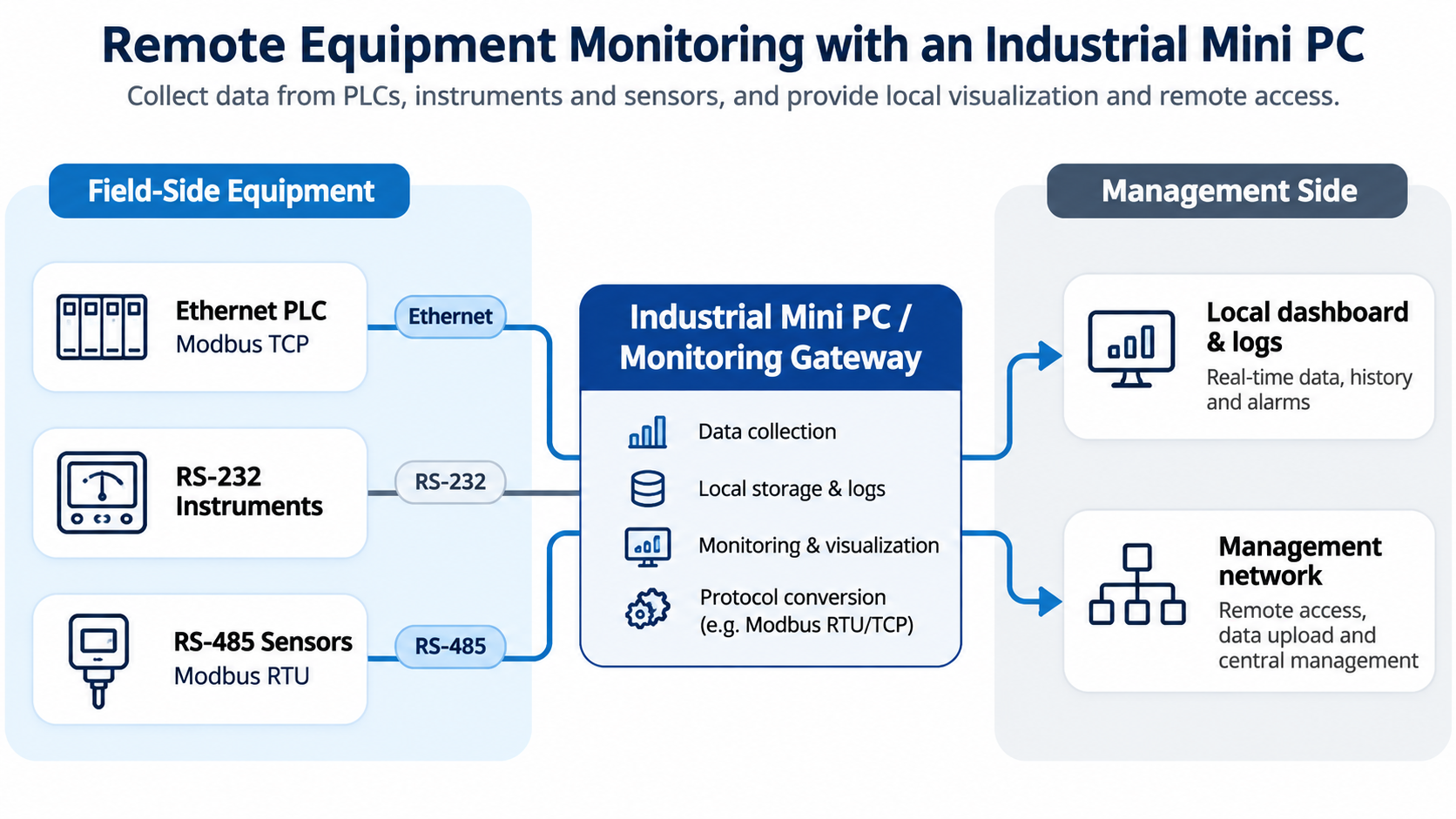
1. Build a Monitoring Gateway Around Existing Equipment
Consider a production workshop with three types of equipment:
RS-232 instruments: Legacy measuring devices that communicate through individual serial connections.
RS-485 sensors: Temperature, power or environmental monitoring devices sharing an industrial serial bus.
Ethernet PLCs: Controllers connected to a local industrial network.
An industrial Mini PC can collect data from these devices and provide a common interface for logging, visualization and remote monitoring.
A typical architecture looks like this:
Field Devices → Industrial Mini PC → Local Database / Dashboard → Management Network
The Mini PC should primarily handle data acquisition and monitoring. Safety-critical machine control should remain with the equipment's dedicated controllers.
This architecture is a reference design, not a claim that every Qotom model has been tested with every PLC or industrial protocol.
2. Understand RS-232, RS-485 and Modbus Communication
The physical interface is only one part of the connection. The monitoring software must also support the device's communication protocol.
| Connection | Typical Use | Deployment Consideration |
|---|---|---|
| RS-232 | Legacy instruments | Usually a dedicated point-to-point connection |
| RS-485 | Sensors and controllers | Supports multidrop networks with appropriate wiring and addressing |
| Modbus RTU | Serial industrial data | Requires matching serial parameters and device register maps |
| Modbus TCP | Ethernet industrial data | Requires IP connectivity and compatible Modbus services |
RS-485 does not automatically mean Modbus RTU. RS-485 defines electrical signaling, while Modbus RTU defines a communication protocol. Some RS-485 devices use proprietary protocols.
Likewise, connecting an Ethernet cable to a PLC does not guarantee Modbus TCP support.
Before deployment, confirm the device protocol, baud rate, parity, stop bits, device address and register documentation.
For an RS-485 network, also check wiring polarity, termination requirements and the number of connected devices.
3. Choose Qotom Hardware Based on Interface Requirements
Two Qotom product families illustrate different approaches to industrial monitoring.
Q10100XP-S04 — For Multiple Legacy RS-232 Instruments
The Q10100XP-S04 supports Intel Bay Trail processors, including the J1900 configuration. It provides seven RS-232 ports, two Gigabit Ethernet interfaces, up to 8GB DDR3L memory, and mSATA plus SATA storage options.
Its seven serial ports make it relevant when several independent RS-232 instruments must connect to one monitoring computer.
The fanless chassis is useful for installations where avoiding a mechanical cooling fan is desirable. However, its older processor platform and memory capacity make it better suited to relatively lightweight monitoring applications than demanding modern workloads.
Q31200X-S10 — For Mixed Serial and Ethernet Monitoring
The Q31200X-S10 supports Intel 12th/13th Gen processor configurations, up to 32GB DDR4, six RS-232 ports and two Intel 2.5GbE interfaces.
COM1 and COM2 can be configured for RS-485, making the platform relevant for installations that combine RS-485 equipment with other serial devices.
It also offers an M.2 2280 PCIe 4.0 ×4 SSD interface and a 2.5-inch SATA storage connection.
This configuration provides more room for local databases, monitoring dashboards and multiple software services, depending on processor selection and workload.
Before ordering, verify the exact processor, serial mode configuration and cooling option required for the project.
4. Separate Equipment Access From Remote Management
A dual-LAN industrial Mini PC can connect an equipment network and a management network through separate physical interfaces.
For example:
LAN 1: Connects to an industrial switch serving Ethernet PLCs.
LAN 2: Connects to the management network used by monitoring staff.
COM ports: Connect directly to compatible RS-232 or RS-485 equipment.
However, two LAN ports alone do not create secure isolation. Routing, firewall rules, user permissions and remote-access policies must be configured appropriately.
For Modbus monitoring, use software that supports the required transport and device register maps. Data acquisition intervals should reflect how quickly measurements change and what the connected devices can handle.
A one-second polling interval may be reasonable for some monitoring tasks, but unnecessary or excessive for others.
Finally, consider the operational requirements: automatic restart after power restoration where supported, reliable SSD storage, log rotation, backups and recovery procedures.
Conclusion
An effective industrial monitoring gateway starts with communication compatibility, not processor performance alone.
For installations dominated by legacy RS-232 instruments, the Qotom Q10100XP-S04 provides a high serial-port count in a compact system. For mixed serial networks requiring configurable RS-485 interfaces, more modern processing options and faster Ethernet connectivity, the Q31200X-S10 offers a different hardware foundation.
By matching interfaces, protocols, software and network design to the actual equipment, system integrators can build practical remote monitoring solutions without replacing existing industrial controllers.